Sunday, July 26, 2020

Install Postgres DB in docker

docker search postgresql

docker run --name postgresqldb -e POSTGRES_USER=myusername -e POSTGRES_PASSWORD=mypassword -p 5432:5432 -v /data:/var/lib/postgresql/data -d postgres


docker ps


docker start postgresqldb


Install PG Admin
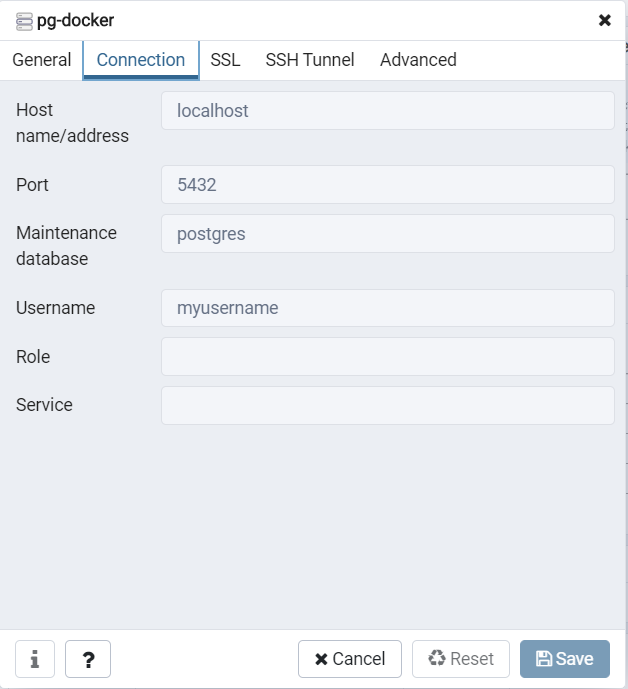


docker stop postgresqldb


Listing the docker images history

docker image ls

Tuesday, May 22, 2018

Working with Cloudera


HDFS Files Path:

http://<hostname>:50070/explorer.html#/

Useful Unix Commands

Extracting 1 - 10 lines from an input.txt file and write to output.txt
sed -n -e '1,10p' input.txt > output.txt

Wednesday, October 25, 2017

Run shell script using Oozie job

In this I will show how to automate shell scripts using Oozie framework.

First create job.properties file.

1
2
3
4
5
6
nameNode=hdfs://localhost:8020
jobTracker=localhost:8050
queueName=default
oozie.wf.application.path=/<Hdfs Path>/sampleworkflow.xml
oozie.use.system.libpath=true
oozie.libpath=<shared lib path on Hdfs>

Create sampleworkflow.xml and place it in Hdfs.
1
 2
 3
 4
 5
 6
 7
 8
 9
10
11
12
13
14
15
16
17
18
19
20
21
22
23
<workflow-app name="shell-wf" xmlns="uri:oozie:workflow:0.4">
 <start to="shell-node"/>
 <action name="shell-node">
 <shell xmlns="uri:oozie:shell-action:0.2">
 <job-tracker>${jobTracker}</job-tracker>
 <name-node>${nameNode}</name-node>
 <configuration>
    <property>
    <name>mapred.job.queue.name</name>
    <value>${queueName}</value>
    </property>
  </configuration>
 <exec>sample.sh</exec>
 <file>/<Hdfs Path of the shell script>/sample.sh</file>
 </shell>
 <ok to="end"/>
 <error to="fail"/>
 </action>
 <kill name="fail">
 <message>Shell action failed, error message[${wf:errorMessage(wf:lastErrorNode())}]</message>
 </kill>
 <end name="end"/>
</workflow-app>


Running the job:
1
oozie job -oozie http://localhost:11000/oozie -config job.properties -run


Java Client for Secure Web Socket

This post is how to connect a websocket which is secured by Basic Authentication.

I will be using javax.websocket-api jar file.

Create WebContainer object

WebSocketContainer container = ContainerProvider.getWebSocketContainer();

using the container connect to the service

1
container.connectToServer(endpoint, clientConfig, new URI("wss://hostname:port/demo"));


credentials are passed to clientConfig object.

1
 2
 3
 4
 5
 6
 7
 8
 9
10
11
ClientEndpointConfig.Configurator configurator = new ClientEndpointConfig.Configurator() {
             public void beforeRequest(Map<String, List<String>> headers) {
          String credentials = "username:password";
          headers.put("Authorization", Arrays.asList("Basic " + new BASE64Encoder().encode(credentials.getBytes())));
                 System.out.println("Header set successfully");
             }
         };

         ClientEndpointConfig clientConfig = ClientEndpointConfig.Builder.create()
                 .configurator(configurator)
                 .build();


endpoint is the callback handler. Once the session is established with the service then we pass a message using the session object. onMessage() method should be overridden to receive the message.

1
 2
 3
 4
 5
 6
 7
 8
 9
10
11
12
13
14
15
16
17
18
Endpoint endpoint = new Endpoint() {
  @Override
                public void onOpen(Session session, EndpointConfig config) {
                    session.addMessageHandler(new MessageHandler.Whole<String>() {
                        @Override
                        public void onMessage(String content) {
                            System.out.println("Received message: "+content);
                        }
                    });
                    try {
                 System.out.println("Sending message to endpoint: " + msg);
                        System.out.println("Session Id:: "+session.getId());
   session.getBasicRemote().sendText(msg);
      } catch (Exception e) {
   e.printStackTrace();
      }
                }
            };

Thursday, October 19, 2017

Connect to Cassandra from RStudio

In order to connect to cassandra from rstudio RJDBC library would help.

Prerequisites:
Install RJDBC library
1
install.packages("RJDBC")


Place cassandra-jdbc.jar library in the cassandra libraries folder. In my environment it's placed under the path '/usr/share/dse/cassandra/lib/'

Make sure thrift protocol is enabled on the cassandra cluster
1
nodetool statusthrift


If thrift is disabled it can be enabled with following command

1
nodetool enablethrift


R Script:

1
2
3
4
library(RJDBC)
cassdrv <- JDBC("org.apache.cassandra.cql.jdbc.CassandraDriver",list.files("/usr/share/dse/cassandra/lib/",pattern="jar$",full.names=T))
casscon <- dbConnect(cassdrv, "jdbc:cassandra://localhost:9160/test")
res <- dbGetQuery(casscon, "select * from emp")

Tuesday, October 17, 2017

Java Custom Accumulators implementation to collect bad records

Accumulators:

During transformations in spark we often encounter a problem where we can use the variables defined outside the function that we pass to map() or filter but cannot pass the data from the function back to driver. Accumulators which is a shared variable in the spark cluster solve this problem.

Accumulators work as follows:
  • We create them in the driver by calling the SparkContext.accumulator(initial Value) method, which produces an accumulator holding an initial value. The return type is an org.apache.spark.Accumulator[T] object, where T is the type of initialValue.
  • Worker code in Spark closures can add to the accumulator with its += method (or add in Java).
  • The driver program can call the value property on the accumulator to access its value (or call value() and setValue() in Java).

Spark’s built-in accumulator types: integers (Accumulator[Int]) with addition. Out of the box, Spark supports accumulators of type Double, Long, and Float. In addition to these, Spark also includes an API to define custom accumulator types.

Custom accumulators need to extend AccumulatorParam, which is covered in the Spark API documentation. Beyond adding to a numeric value, we can use any operation for add, provided
that operation is commutative and associative.

I have a requirement where I have data in a file I want to collect the records who length is greater than characters:

First I create custom accumulator implementing org.apache.spark.AccumulatorParam

1
 2
 3
 4
 5
 6
 7
 8
 9
10
11
12
13
14
15
16
17
18
19
20
21
22
23
public class RecordAccmulator implements AccumulatorParam<Map<String, String>> {
    private static final long serialVersionUID = 1L;

  @Override
  public Map<String, String> addInPlace(Map<String, String> arg0, Map<String, String> arg1) {
    Map<String, String> map = new HashMap<>();
    map.putAll(arg0);
    map.putAll(arg1);
    return map;
  }

  @Override
  public Map<String, String> zero(Map<String, String> arg0) {

    return new HashMap<>();
  }

  @Override
  public Map<String, String> addAccumulator(Map<String, String> arg0, Map<String, String> arg1) {

    return addInPlace(arg0, arg1);
  }
}


I use the custom accumulator in my business class:

1
 2
 3
 4
 5
 6
 7
 8
 9
10
11
12
13
14
15
16
17
18
19
20
21
22
23
24
25
26
27
JavaSparkContext sc = SparkUtils.createSparkContext(MyTest.class.getName(), "local[*]");
 SQLContext hiveContext = SparkUtils.getSQLContext(sc);
 
 JavaRDD<String> file = sc.textFile("inputfile.txt");
 logger.info("File Record Count:: "+file.count());
 
 
    Accumulator<Map<String, String>> accm = sc.accumulator(new HashMap<>(), new RecordAccmulator());
 
 JavaPairRDD<String, String> filePair = file.mapToPair(new PairFunction<String, String, String>(  ) {

    private static final long serialVersionUID = 1L;

    @Override
    public Tuple2<String, String> call(String t) throws Exception {
        String[] str = StringUtils.split(t,":");
      
      if(str[1].length()>10){
        Map map = new HashMap<>();
        map.put(str[0], str[1]);
        accm.add(map);
      }
      return new Tuple2<String, String>(str[0], str[1]);
    }});
 
 logger.info("Pair Count:: "+filePair.count());
 logger.info("Accumulator Values:: "+accm.value());


Sunday, May 14, 2017

How to process huge files with hadoop

In order to read huge files we cannot afford to load them into memory. One solution would be a BlockingQueue approach.

It's a consumer-producer approach where producer read the file and place in the queue until it's full. Consumer thread is blocked until the queue is non empty.

Queue is created using BlockingQueue interface.

ExecutorService is used to create a consumer thread pool and producer thread pool.

java.util.concurrent.ExecutorService consumer = java.util.concurrent.Executors.newFixedThreadPool(CONSUMERS_COUNT);


Sunday, December 11, 2016

Livy Job Server Implementation

Livy Job Server Installation on Horton Works Data Platform (HDP 2.4):
Download the compressed file from
http://archive.cloudera.com/beta/livy/livy-server-0.2.0.zip

Unzip the file and work on configuration changes.

Configurations:

1
Add 'spark.master=yarn-cluster' in config file '/usr/hdp/current/spark-client/conf/spark-defaults.conf'


livy-env.sh
Add these entries

1
2
3
4
5
6
7
8
export SPARK_HOME=/usr/hdp/current/spark-client
export HADOOP_HOME=/usr/hdp/current/hadoop-client/bin/
export HADOOP_CONF_DIR=/etc/hadoop/conf
export SPARK_CONF_DIR=$SPARK_HOME/conf
export LIVY_LOG_DIR=/jobserver-livy/logs
export LIVY_PID_DIR=/jobserver-livy
export LIVY_MAX_LOG_FILES=10
export HBASE_HOME=/usr/hdp/current/hbase-client/bin


log4j.properties
By default logs roll on console in INFO mode. It can be changed to file rolling with debug enabled with the below configuration:

1
2
3
4
5
6
log4j.rootCategory=DEBUG, NotConsole
log4j.appender.NotConsole=org.apache.log4j.RollingFileAppender
log4j.appender.NotConsole.File=/Analytics/livy-server/logs/livy.log
log4j.appender.NotConsole.maxFileSize=20MB
log4j.appender.NotConsole.layout=org.apache.log4j.PatternLayout
log4j.appender.NotConsole.layout.ConversionPattern=%d{yy/MM/dd HH:mm:ss} %p %c{1}: %m%n

Copy the following libraries to the path '<LIVY SEVER INSTALL PATH>/rsc-jars'

1
2
3
4
5
6
7
8
hbase-common.jar
hbase-server.jar
hbase-client.jar
hbase-rest.jar
guava-11.0.2.jar
protobuf-java.jar
hbase-protocol.jar
spark-assembly.jar


Integrating web Application with Livy job server:
Copy the following libraries to tomcat classpath (lib folder)

1
2
livy-api-0.2.0.jar
livy-client-http-0.2.0.jar


Servlet invokes the LivyClientUtil

LivyClientUtil:
1
2
3
4
5
String livyUrl = "http://127.0.0.1:8998";
LivyClient client = new HttpClientFactory().createClient(new URL(livyUrl).toURI(), null);
client.uploadJar(new File(jarPath)).get();
TimeUnit time = TimeUnit.SECONDS;
String jsonString = client.submit(new SparkReaderJob("08/19/2010")).get(40,time);

SparkReaderJob:

1
2
3
4
5
public class SparkReaderJob implements Job<String> {
@Override
public String call(JobContext jc) throws Exception {
           JavaSparkContext jsc = jc.sc();
} }


References:
http://livy.io/
https://github.com/cloudera/livy

Monday, November 14, 2016

How to call a java class from scala

Create an Eclipse java maven project.

Add Scala nature to the project Right click on project > Configure > Add Scala Nature

Create project structure as:
src/main/java
src/main/scala

Sample Java class:

1
 2
 3
 4
 5
 6
 7
 8
 9
10
11
12
13
14
15
package test.java;

public class Hello {

    public static void main(String[] args) {
        Hello hello = new Hello();
        hello.helloUser("Tomcat");

    }

    public void helloUser(String user) {
        System.out.println("Hello " + user);
    }

}

Calling java class from Scala class

1
 2
 3
 4
 5
 6
 7
 8
 9
10
11
package test.scala;

import test.java.Hello

object HelloScala {

  def helloScala() {
    val hello = new Hello()
    hello.helloUser("Scala")
  }
}


POM file:

1
 2
 3
 4
 5
 6
 7
 8
 9
10
11
12
13
14
15
16
17
18
19
20
21
22
23
24
25
26
27
28
29
30
31
32
33
34
35
36
37
38
39
40
41
42
43
44
45
46
47
48
49
50
51
52
53
54
55
56
57
58
59
60
61
62
63
64
65
66
67
68
69
70
71
72
73
74
75
76
77
78
79
80
81
82
83
84
85
86
87
88
89
90
91
92
93
94
95
<project xmlns="http://maven.apache.org/POM/4.0.0" xmlns:xsi="http://www.w3.org/2001/XMLSchema-instance"
    xsi:schemaLocation="http://maven.apache.org/POM/4.0.0 http://maven.apache.org/xsd/maven-4.0.0.xsd">
    <modelVersion>4.0.0</modelVersion>
    <groupId>Java_Scala_Project</groupId>
    <artifactId>Java_Scala_Project</artifactId>
    <version>0.0.1-SNAPSHOT</version>
    <dependencies>
        <dependency>
            <groupId>org.scala-lang</groupId>
            <artifactId>scala-library</artifactId>
            <version>2.10.4</version>
        </dependency>

    </dependencies>

    <!-- <repositories>
        <repository>
            <id>scala</id>
            <name>Scala Tools</name>
            <url>http://scala-tools.org/repo-releases/</url>
            <releases>
                <enabled>true</enabled>
            </releases>
            <snapshots>
                <enabled>false</enabled>
            </snapshots>
        </repository>
    </repositories> -->

    <pluginRepositories>
        <pluginRepository>
            <id>scala</id>
            <name>Scala Tools</name>
            <url>http://scala-tools.org/repo-releases/</url>
            <releases>
                <enabled>true</enabled>
            </releases>
            <snapshots>
                <enabled>false</enabled>
            </snapshots>
        </pluginRepository>
    </pluginRepositories>

    <build>
        <sourceDirectory>src</sourceDirectory>
        <plugins>
            <plugin>
                <artifactId>maven-compiler-plugin</artifactId>
                <version>3.3</version>
                <configuration>
                    <source>1.7</source>
                    <target>1.7</target>
                </configuration>
            </plugin>
            <plugin>
                <groupId>org.scala-tools</groupId>
                <artifactId>maven-scala-plugin</artifactId>
                <executions>
                    <execution>
                        <goals>
                            <goal>compile</goal>
                            <goal>testCompile</goal>
                        </goals>
                    </execution>
                </executions>
            </plugin>
            <plugin>
                <groupId>org.scala-tools</groupId>
                <artifactId>maven-scala-plugin</artifactId>
                <executions>
                    <execution>
                        <id>compile</id>
                        <goals>
                            <goal>compile</goal>
                        </goals>
                        <phase>compile</phase>
                    </execution>
                    <execution>
                        <id>test-compile</id>
                        <goals>
                            <goal>testCompile</goal>
                        </goals>
                        <phase>test-compile</phase>
                    </execution>
                    <execution>
                        <phase>process-resources</phase>
                        <goals>
                            <goal>compile</goal>
                        </goals>
                    </execution>
                </executions>
            </plugin>
        </plugins>
    </build>
</project> 

Thursday, September 22, 2016

Spark Trouble shooting

Increasing the resultset size:
  • spark-submit: --conf spark.driver.maxResultSize=4g
  • conf.set("spark.driver.maxResultSize", "4g")
  • spark-defaults.conf: spark.driver.maxResultSize 4g

Wednesday, September 21, 2016

Useful Amazon EC2 commands

SSH to EC2 instance:
sudo ssh -i <path/cluster.pem> user@public DNS

SCP file from desktop to EC2 instance:

Thursday, August 4, 2016

Useful Commands

Adding a header to an existing file:

echo -e "field1,field2,field3,field4,field5" | cat - test.csv > /tmp/tempFile && mv /tmp/tempFile test.csv

grep a file with wild card in the search string

grep "08/../2010" test.csv

Delete a line from a file matching a search string
sed -i.bak '/search string/d' file

Delete first line from the file
sed '1d' file.txt > tmpfile; mv tmpfile file.txt

Starting Hive session with Tez execution engine
hive --hiveconf hive.execution.engine=Tez 

Installing artifact into maven repository
mvn install:install-file -DgroupId=jdk.tools -DartifactId=jdk.tools -Dpackaging=jar -Dversion=1.6 -Dfile=tools.jar -DgeneratePom=true
 Installing Java 8 on centos
su -c "yum install java-1.8.0-openjdk"
 Updating JAVA_HOME
sudo gedit .bash_profile
Add JAVA_HOME=/usr/lib/jvm/java-1.8.0/jre
Update java -version
sudo vi .bashrc
Add PATH=/usr/lib/jvm/java-1.8.0/jre/bin:$PATH


Saturday, July 16, 2016

Basics Stats

Mean
A mean score is an average score, often denoted by X. It is the sum of individual scores divided by the number of individuals.

Median

The median is a simple measure of central tendency. To find the median, we arrange the observations in order from smallest to largest value. If there is an odd number of observations, the median is the middle value. If there is an even number of observations, the median is the average of the two middle values.

Mode
The mode is the most frequently appearing value in a population or sample.


Wednesday, July 6, 2016

Accessing Hbase from shell

Create table

create 'Test-Table', 'Test-Column-Family'

Add records to the table

put ’Test-Table’,’ROW_KEY’,’Test-Column-Family:Test-Column-Qualifier’,’Test-Value’

Scan entire table

scan 'Test-Table'

Scan with Column Family

scan 'Test-Table', {COLUMNS => 'Test-Column-Family'}


Scan with Column Family and Column Qualifier
 scan 'Test-Table', {COLUMNS => 'Test-Column-Family:Test-Column-Qualifier'}

Scan the entire table, limit number of records displayed to 10

 scan 'Test-Table', {COLUMNS => 'Test-Column-Family:Test-Column-Qualifier', LIMIT => 10}

Add a column family to an existing table

alter 'Test-Table', NAME => 'Test-Column-Family2'


Delete a Column Family

alter 'Test-Table', 'delete' => 'Test-Column-Family2'

Delete entire table

Deleting table is 2 step process first it has to be disabled and then dropped

disable 'Test-Table' 

drop 'Test-Table'

Saturday, July 2, 2016

Machine Learning Terminolgy

Regularization is a technique used to solve over fitting problem. Other techniques include early stopping, cross validation.
Bias–variance trade off is the problem of simultaneously minimizing two sources of error that prevent supervised learning algorithms from generalizing beyond their training set:
i) The bias is error from erroneous assumptions in the learning algorithm. High bias can cause an algorithm to miss the relevant relations between features and target outputs (underfitting).

ii) The variance is error from sensitivity to small fluctuations in the training set. High variance can cause overfitting: modeling the random noise in the training data, rather than the intended outputs.
Algorithms classification:
Discrminative Learning Algorithms:
Algorithms that try to learn p(y|x) directly (such as logistic regression),or algorithms that try to learn mappings directly from the space of inputs X to the labels{0,1}, (such as the perceptron algorithm) are called discriminative learning algorithms.
Generative Learning Algorithms:
Algorithms that instead try to model p(x|y) (and p(y)). These algorithms are called generative learning algorithms. For instance, if y indicates whether an example is a dog (0) or an elephant (1), then p(x|y= 0) models the distribution of dogs’ features, and p(x|y= 1) models the distribution of elephants’ features.
Source: http://cs229.stanford.edu/notes/cs229-notes2.pdf

What is Self Organizing Map in Neural Nets?

Teuvo Kohonen introduced a special class of ANNs called Self-Organizing feature maps. These maps are based on competitive learning.

In competitive learning neurons compete among themselves to be activated.

Brain is dominated by the cerebral cortex, a very complex structure of billions neurons and hundreds of billions synapses.

It includes areas that are responsible for different human activities (motor, visual, auditory, somatosensory, etc.), and associated with different  sensory inputs.

Each sensory input is mapped into a corresponding area of the cerebral cortex.The cortex is a self -organizing computational map The cortex is a self -organizing computational map in the human brain.

Classification Model Performance Metrics

Confusion matrix


Precision:  Proportion of patients  diagnosed as having cancer actually had cancer. In other words how many selected items are relevant.
TP/TP+FP

Recall: Proportion of patients that actually had cancer were diagnosed  as having cancer. In other words how many relevant items are selected.
TP/TP+FN


Thursday, June 30, 2016

Linear Regression using Java Spark MLib

In this post I am reading data from Hbase table and create a Spark Vector to pass to LinearRegressionWithSGD

In Spark Vector all the features would be placed as columns. Vector have 2 implementations DenseVectorSparseVector. If the data is having many zeros better go with Sparse vector to save memory. Once the feature vector is created place each vector in LabeledPoint by labeling it. LabeledPoint can be visualized as rows and columns of an excel sheet. Each row is a training sample and columns are features. First column is a label or dependent variable or the variable to be predicted.

The reason I have chosen Stochastic Gradient Descent (SGD) compared to Gradient Descent (GD) is in SGD only one training example is taken in a particular iteration to perform an update where as in GD all samples are considered. My training examples are high so SGD is faster than GD. As I am fine with close approximations which SGD provides. Error function is not well minimized in case of SGD.


1
 2
 3
 4
 5
 6
 7
 8
 9
10
11
12
13
14
15
16
17
18
19
20
21
22
23
24
25
26
27
28
29
30
31
32
33
34
35
36
37
38
39
40
41
42
43
44
45
46
47
48
49
Configuration conf = HBaseConfiguration.create();
conf.setLong("hbase.rpc.timeout", 600000);

conf.setLong("hbase.client.scanner.caching", 1000);

conf.set(TableInputFormat.INPUT_TABLE, SOURCE_TABLE);
SparkConf sparkConf = new SparkConf();
JavaSparkContext jsc = new JavaSparkContext(sparkConf);

JavaPairRDD < ImmutableBytesWritable, Result > inputRDD =

 jsc.newAPIHadoopRDD(conf, TableInputFormat.class, ImmutableBytesWritable.class, Result.class);

//Extracting the data from the Hbase table. I am taking values from 3 Hbase Columns. 


JavaPairRDD < String, String[] > dataRDD =
 inputRDD.mapToPair(new PairFunction<Tuple2 <ImmutableBytesWritable, Result> , String, String[]>() {

  private static final long serialVersionUID = 1 L;
  @Override
  public Tuple2 < String, String[] > call(Tuple2 < ImmutableBytesWritable, Result > tuple) throws Exception {
   String[] strArr = new String[3];
   Arrays.fill(strArr, "0.0");
   try {

    Result result = tuple._2;
    String keyRow = Bytes.toString(result.getRow());
    String val = null;
    if ((val = Bytes.toString(result.getValue(Bytes.toBytes(COLUMN_FAMILY), Bytes.toBytes(COLUMN_QUALIFIER)))) != null) {
     strArr[0] = val;
    }
    if ((val = Bytes.toString(result.getValue(Bytes.toBytes(COLUMN_FAMILY), Bytes.toBytes(COLUMN_QUALIFIER)))) != null) {
     strArr[1] = val;
    }
    if ((val = Bytes.toString(result.getValue(Bytes.toBytes(COLUMN_FAMILY), Bytes.toBytes(COLUMN_QUALIFIER)))) != null) {
     strArr[2] = val;
    }
    return new Tuple2 < String, String[] > (keyRow, strArr);
   } catch (Exception e) {
    e.printStackTrace();

    return null;

   }

  }

 });


// Prepare the RDD with the labels and features. I am taking label as 0.5. Based on your use case this may vary.      

1
 2
 3
 4
 5
 6
 7
 8
 9
10
11
12
13
14
15
16
17
18
19
20
21
22
23
24
25
26
27
28
29
30
31
32
33
34
35
36
37
38
39
40
41
42
43
44
45
46
47
48
49
50
51
52
53
54
55
56
57
58
59
JavaRDD<LabeledPoint> parsedData = dataRDD.map(new Function<Tuple2<String, String[]> , LabeledPoint>() {


 private static final long serialVersionUID = 1 L;

 @Override

 public LabeledPoint call(Tuple2<String, String[]> line) {


  String[] values = line._2();

  double[] v = new double[values.length];

  for (int i = 0; i < values.length; i++) {

   v[i] = Double.parseDouble(values[i]);

  }

  return new LabeledPoint(0.5, Vectors.dense(v));

 }

});

// Building the model

int numIterations = 100;

double miniBatchFraction = 1.0;

double stepsize = 0.7;

LinearRegressionWithSGD linReg = new LinearRegressionWithSGD(stepsize, numIterations, miniBatchFraction);

linReg.addIntercept();

final LinearRegressionModel model = linReg.run(JavaRDD.toRDD(parsedData));

double MSE = new JavaDoubleRDD(valuesAndPreds.map(

 new Function < Tuple2 < Double, Double > , Object > () {

  private static final long serialVersionUID = 1 L;

  public Object call(Tuple2 < Double, Double > pair) {

   return Math.pow(pair._1() - pair._2(), 2.0);

  }

 }

).rdd()).mean();

logger.info("Training Mean Squared Error = " + MSE);